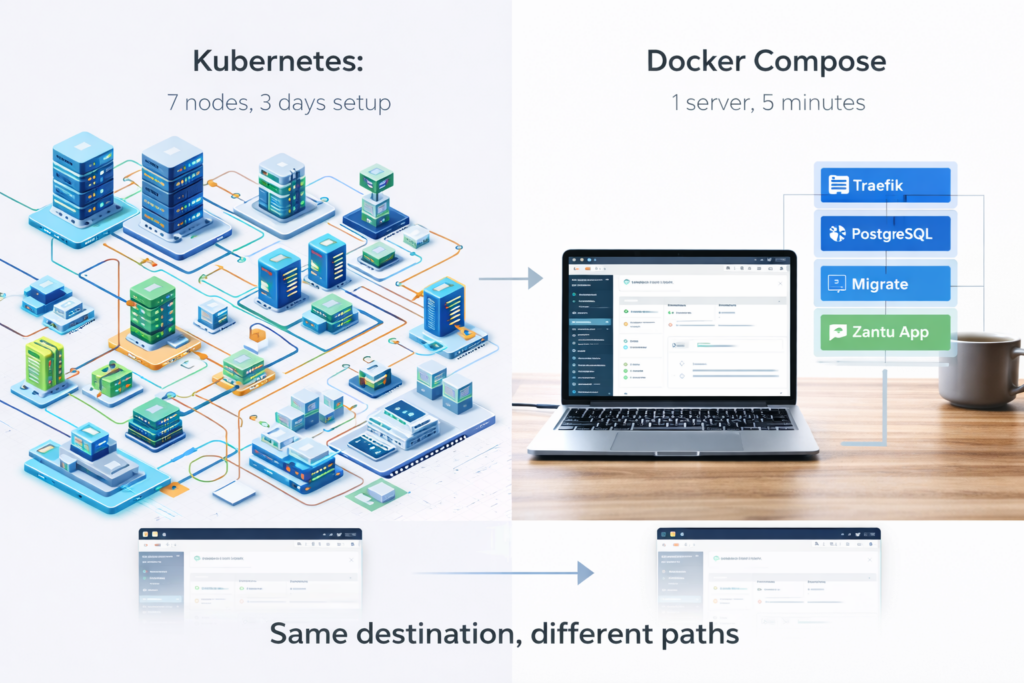
Context: Last week I showed you how to build a production Kubernetes cluster—3 control planes, 4 worker nodes, HA PostgreSQL, pod anti-affinity, chaos testing. That guide took 2 days and taught you how infrastructure actually works.
This week: the same application running on docker-compose in 5 minutes.
Here’s when you need which approach.
What We’re Deploying
Zantu is my multi-tenant SaaS platform and serves as the foundation for Organizations on Zantu and other applications I’m building.
Tech stack:
- Node.js/Express backend
- React frontend (Vite)
- PostgreSQL database
- Traefik reverse proxy
- Let’s Encrypt SSL
In Kubernetes: 4 worker nodes + 3 control planes, load balancer, StatefulSets, anti-affinity rules, monitoring stack.
In Docker Compose: One server, five containers, done.
The Docker Compose Setup
Here’s the entire production configuration (straight from the Zantu repository):
# docker-compose.yml
services:
  traefik:
    image: traefik:v3.0
    container_name: zantu-traefik
    restart: unless-stopped
    command:
      # API and Dashboard
      - "--api.dashboard=true"
      - "--api.insecure=false"
      # Docker provider
      - "--providers.docker=true"
      - "--providers.docker.exposedbydefault=false"
      - "--providers.docker.network=zantu-network"
      # Dynamic file provider for tenant domains
      - "--providers.file.directory=/etc/traefik/dynamic"
      - "--providers.file.watch=true"
      # Entrypoints
      - "--entrypoints.web.address=:80"
      - "--entrypoints.websecure.address=:443"
      # HTTP to HTTPS redirect
      - "--entrypoints.web.http.redirections.entrypoint.to=websecure"
      - "--entrypoints.web.http.redirections.entrypoint.scheme=https"
      # Let's Encrypt ACME
      - "--certificatesresolvers.letsencrypt.acme.email=${ACME_EMAIL:-admin@zantu.cloud}"
      - "--certificatesresolvers.letsencrypt.acme.storage=/letsencrypt/acme.json"
      - "--certificatesresolvers.letsencrypt.acme.httpchallenge.entrypoint=web"
      # Logging
      - "--log.level=INFO"
    ports:
      - "80:80"
      - "443:443"
    volumes:
      - /var/run/docker.sock:/var/run/docker.sock:ro
      - traefik-letsencrypt:/letsencrypt
      - traefik-dynamic:/etc/traefik/dynamic
    networks:
      - zantu-network
    labels:
      - "traefik.enable=false"  # Dashboard disabled for production

  postgres:
    image: postgres:16-alpine
    container_name: zantu-db
    restart: unless-stopped
    environment:
      POSTGRES_USER: ${POSTGRES_USER:-zantu}
      POSTGRES_PASSWORD: ${POSTGRES_PASSWORD:-zantu}
      POSTGRES_DB: ${POSTGRES_DB:-zantu}
    volumes:
      - postgres-data:/var/lib/postgresql/data
    healthcheck:
      test: ["CMD-SHELL", "pg_isready -U ${POSTGRES_USER:-zantu} -d ${POSTGRES_DB:-zantu}"]
      interval: 10s
      timeout: 5s
      retries: 5
      start_period: 10s
    networks:
      - zantu-network

  zantu-migrate:
    build:
      context: .
      dockerfile: Dockerfile
    image: ghcr.io/scotthugh/zantu:latest
    container_name: zantu-migrate
    command: ["node", "dist/migrate.js"]
    environment:
      DATABASE_URL: postgresql://${POSTGRES_USER:-zantu}:${POSTGRES_PASSWORD:-zantu}@postgres:5432/${POSTGRES_DB:-zantu}
      DB_DRIVER: pg
    depends_on:
      postgres:
        condition: service_healthy
    networks:
      - zantu-network
    restart: "no"  # Runs once then exits

  zantu-app:
    build:
      context: .
      dockerfile: Dockerfile
    image: ghcr.io/scotthugh/zantu:latest
    container_name: zantu-app
    restart: unless-stopped
    environment:
      NODE_ENV: production
      PORT: 5000
      DB_DRIVER: pg
      DATABASE_URL: postgresql://${POSTGRES_USER:-zantu}:${POSTGRES_PASSWORD:-zantu}@postgres:5432/${POSTGRES_DB:-zantu}
      SESSION_SECRET: ${SESSION_SECRET}
      TRAEFIK_DYNAMIC_CONFIG_PATH: /etc/traefik/dynamic
    volumes:
      # Share Traefik dynamic config for verified custom domains
      - traefik-dynamic:/etc/traefik/dynamic
    depends_on:
      postgres:
        condition: service_healthy
      zantu-migrate:
        condition: service_completed_successfully
    healthcheck:
      test: ["CMD", "wget", "--no-verbose", "--tries=1", "--spider", "http://127.0.0.1:5000/healthz"]
      interval: 30s
      timeout: 10s
      retries: 3
      start_period: 15s
    networks:
      - zantu-network
    labels:
      # Traefik routing for multiple domains
      - "traefik.enable=true"
      # Main domain (zantu.cloud)
      - "traefik.http.routers.zantu-cloud.rule=Host(`zantu.cloud`) || Host(`www.zantu.cloud`)"
      - "traefik.http.routers.zantu-cloud.entrypoints=websecure"
      - "traefik.http.routers.zantu-cloud.tls.certresolver=letsencrypt"
      - "traefik.http.routers.zantu-cloud.service=zantu-app"
      # Alternative domain (zantu.io)
      - "traefik.http.routers.zantu-io.rule=Host(`zantu.io`) || Host(`www.zantu.io`)"
      - "traefik.http.routers.zantu-io.entrypoints=websecure"
      - "traefik.http.routers.zantu-io.tls.certresolver=letsencrypt"
      - "traefik.http.routers.zantu-io.service=zantu-app"
      # Service definition
      - "traefik.http.services.zantu-app.loadbalancer.server.port=5000"

volumes:
  postgres-data:
    driver: local
  traefik-letsencrypt:
    driver: local
  traefik-dynamic:
    driver: local

networks:
  zantu-network:
    name: zantu-network
    driver: bridge
Key features:
- Separate migration container (runs once, exits cleanly)
- Health checks on database and app
- Traefik v3 with dynamic configuration for custom tenant domains
- Automatic Let’s Encrypt SSL for multiple domains
- Shared volume for dynamic Traefik config (enables custom domain feature)
That’s it. The entire production setup.
The .env File
# .env
POSTGRES_PASSWORD=your-secure-password-here
SESSION_SECRET=your-session-secret-32-chars-minimum
STRIPE_SECRET_KEY=sk_live_your_stripe_key
STRIPE_WEBHOOK_SECRET=whsec_your_webhook_secret
Deployment Steps
1. Install Docker
On Ubuntu 24.04 LTS (what I actually run in production):
# Install Docker
curl -fsSL https://get.docker.com | sh

# Add your user to docker group
sudo usermod -aG docker $USER

# Log out and back in, or run:
newgrp docker

# Verify
docker --version
docker compose version
2. Clone Your Repository
# Clone Zantu (or your application)
git clone https://github.com/your-username/zantu.git
cd zantu

# Or if deploying to existing directory
cd /opt/zantu
git pull origin main
3. Configure Environment
# Copy example env file
cp .env.example .env

# Edit with your secrets
nano .env
Your .env should contain:
# Database
POSTGRES_USER=zantu
POSTGRES_PASSWORD=your-secure-password-here
POSTGRES_DB=zantu

# Application
SESSION_SECRET=your-session-secret-32-chars-minimum
NODE_ENV=production

# ACME/Let's Encrypt
ACME_EMAIL=your-email@example.com
4. Deploy Using the Deploy Script
The repository includes deploy-docker.sh which handles everything:
# Make script executable
chmod +x deploy-docker.sh

# Deploy (incremental update)
./deploy-docker.sh

# Or full rebuild (removes containers, keeps data)
./deploy-docker.sh --full
What the script does:
- Pulls latest code from git
- Builds Docker images (with BuildKit optimization)
- Pulls external images (postgres, traefik)
- Force recreates containers with new images
- Waits for health checks
- Runs database migrations automatically
- Cleans up old images
- Tests internal routing
Output looks like:
==================================================
  Zantu Docker Deployment
==================================================

[2024-12-30 10:15:23] Step 1/5: Pulling latest code from git...
Already up to date.

[2024-12-30 10:15:24] Step 2/5: Incremental update mode
[2024-12-30 10:15:24] Step 3/5: Building Docker images...
[+] Building 45.2s (18/18) FINISHED

[2024-12-30 10:16:10] Step 4/5: Pulling external images...
[2024-12-30 10:16:15] Step 5/5: Starting containers...
[+] Running 5/5
 ✔ Network zantu-network       Created
 ✔ Volume "traefik-letsencrypt" Created
 ✔ Container zantu-traefik     Started
 ✔ Container zantu-db          Started
 ✔ Container zantu-migrate     Started
 ✔ Container zantu-app         Started

[2024-12-30 10:16:20] Waiting for services to become healthy...
[2024-12-30 10:16:22] zantu-db is healthy!
[2024-12-30 10:16:35] zantu-app is healthy!

[2024-12-30 10:16:40] Deployment complete!
That’s it. You’re live.
Daily Operations
View Logs
# All services
docker compose logs -f

# Specific service
docker compose logs -f zantu-app

# Last 100 lines
docker compose logs --tail=100 zantu-app
Restart Services
# Restart app only
docker compose restart zantu-app

# Restart everything
docker compose restart

# Stop everything
docker compose down

# Start again
docker compose up -d
Update Application
# Pull new image
docker compose pull zantu-app

# Restart with new image
docker compose up -d zantu-app
Database Backup
# Backup
docker compose exec postgres pg_dump -U zantu zantu > backup-$(date +%Y%m%d).sql

# Restore
docker compose exec -T postgres psql -U zantu zantu < backup-20241230.sql
Scale (Sort Of)
Docker Compose can run multiple replicas of stateless services:
# Scale the app to 3 instances
docker compose up -d --scale zantu-app=3
But there are limitations:
What works:
- Multiple app containers (stateless services)
- Traefik load balances between them automatically
- Good for handling more concurrent requests
What doesn’t work:
- Can’t scale PostgreSQL this way (it’s stateful)
- No pod anti-affinity (all replicas on same host)
- If host dies, all replicas die
- Container names conflict (Docker appends numbers)
For database replication, you’d need:
- PostgreSQL streaming replication (complex setup)
- Or managed database service (RDS, Cloud SQL)
- Or Patroni/Stolon for HA postgres (even more complex)
Reality check: If you need database HA and multi-replica app serving, you’ve outgrown Docker Compose. That’s when Kubernetes starts making sense.
Monitoring
Basic Health Checks
# Check what's running
docker compose ps

# Check resource usage
docker stats

# Check app health
curl http://localhost:5000/healthz
Add Prometheus + Grafana
# Add to docker-compose.yml
  prometheus:
    image: prom/prometheus:latest
    container_name: prometheus
    volumes:
      - ./prometheus.yml:/etc/prometheus/prometheus.yml
      - prometheus_data:/prometheus
    ports:
      - "9090:9090"
    networks:
      - zantu-network

  grafana:
    image: grafana/grafana:latest
    container_name: grafana
    ports:
      - "3000:3000"
    volumes:
      - grafana_data:/var/lib/grafana
    networks:
      - zantu-network
    labels:
      - "traefik.enable=true"
      - "traefik.http.routers.grafana.rule=Host(`grafana.yourdomain.com`)"
      - "traefik.http.routers.grafana.entrypoints=websecure"
      - "traefik.http.routers.grafana.tls.certresolver=letsencrypt"
The Tradeoffs: Docker Compose vs Kubernetes
| Feature | Docker Compose | Kubernetes |
|---|---|---|
| Setup Time | 5 minutes | 2 days |
| Learning Curve | Gentle | Steep |
| Resilience | Single server failure = downtime | Multi-server HA |
| Scaling | Manual, limited | Automatic, unlimited |
| Resource Usage | Minimal overhead | Significant overhead |
| Updates | Manual, brief downtime | Rolling, zero downtime |
| Cost | Single $20/month VPS | Multiple servers required |
| Debugging | Simple (docker logs) | Complex (kubectl describe) |
| Understanding | Surface level | Deep infrastructure knowledge |
When Docker Compose is Enough
Use Docker Compose if:
- You’re running a side project or small business
- Single server capacity handles your load (<1000 users)
- Brief downtime during updates is acceptable
- You don’t have dedicated ops resources
- You want to ship fast and iterate
You can run a profitable SaaS on Docker Compose. Many do.
When You Need Kubernetes
Move to Kubernetes when:
- Downtime costs real money
- You need geographic distribution
- Load exceeds single-server capacity
- You have ops expertise (or budget to hire)
- Compliance requires multi-region redundancy
- You’re building platform-level infrastructure
Or when you want to learn infrastructure at a deep level, even if you don’t strictly need it yet.
The Actual Difference
Docker Compose:
# Deploy update
docker compose pull
docker compose up -d

# 10-second downtime while container restarts
# If update breaks, manual rollback
# If server dies, everything dies
Kubernetes:
# Deploy update
kubectl set image deployment/zantu zantu=ghcr.io/scotthugh/zantu:v1.2.3

# Rolling update, zero downtime
# Automatic rollback if health checks fail
# If worker dies, pods reschedule elsewhere
The difference: Kubernetes is self-healing. Docker Compose is not.
My Production Setup
Current deployment: Both Docker Compose (Ubuntu 24.04 LTS) and Kubernetes
- Docker Compose for rapid iteration and testing
- Kubernetes for production-grade deployment
- Same codebase, different infrastructure
Both are valid. The choice depends on your specific requirements and stage of growth.
Cost Comparison
Docker Compose stack (all-in-one):
- 1x VPS: 4 vCPU, 8GB RAM, 200GB disk
- Cost: $20-40/month
- Handles: 500-2000 concurrent users
Kubernetes cluster (as built):
- 7x VMs: 3 control planes + 4 workers
- Total: 36 vCPU, 106GB RAM, 700GB disk
- Cost: $150-300/month (or free on own hardware)
- Handles: 10,000+ concurrent users
7.5x the cost, 5-10x the capacity, 100x the complexity.
Pick accordingly.
Upgrading Path
Start with Docker Compose:
- Deploy fast, validate product-market fit
- Serve hundreds of customers profitably
- Learn what actually matters vs theory
Move to Kubernetes when:
- Downtime starts costing more than ops overhead
- You have revenue to justify infrastructure investment
- You need features Docker Compose can’t provide
Or stay on Docker Compose forever. Plenty of successful companies do.
The Actual Deployment Files
I’ve deployed Zantu both ways. The docker-compose setup runs in my homelab for testing. The Kubernetes cluster runs the production-grade version.
Same application. Different infrastructure. Different tradeoffs.
The Kubernetes version taught me infrastructure deeply. The Docker Compose version proves you don’t need complexity to ship.
What You Should Do
If you’re reading this to learn Kubernetes: Build the full cluster. The knowledge compounds.
If you’re reading this to ship a product: Start with Docker Compose. Move to Kubernetes when revenue justifies it.
If you want both: Do what I did. Run Docker Compose in production, build Kubernetes to learn, migrate when ready.
Next Steps
For Docker Compose deployment:
- Copy the docker-compose.yml above
- Configure your .env file
- Point DNS to your server
- Run
docker compose up -d - Ship
For Kubernetes deployment:
See my companion article: “Building a Production-Grade RKE2 Kubernetes Cluster“
For the thought leadership behind both:
Read: “The Pottery Class Paradox: Why Rapid Iteration + Reflection Beats Both Quantity and Quality“
Docker Compose is not “wrong.” Kubernetes is not “overkill.”
They’re different tools for different goals.
Pick the one that serves YOUR needs, not the one that sounds impressive.

One Response